
Premium Vendor FAQs
How can I see which retailers are subscribed to my products?
Log into the Vendor Portal and navigate to the Subscribers tab. Here you will be able to view all retailers that are actively subscribed, pending, unsubscribed, denied, & pre-approved.
How often should I update my product data?
Punchmark requires Premium Vendors to update their products AT LEAST every 90 days, though many do every month. This is to ensure up to date listings and prices.
Are more frequent product updates available for Premium Vendors?
Yes, Vendors can opt into the FTP (File Transfer Protocol) system or provide us with an API to connect with our system.
An FTP is a secure folder that Punchmark grants vendors access to. To access this, you will need to download either WINscp (if you are on Windows) or Cyberduck (if you are on Mac). Vendors who have an FTP folder are able to drop in new data sheets whenever they want for immediate processing. Contact vendors@punchmark.com to start this process and see if you are eligible for the FTP program.
What is the process for submitting product updates or new product data?
If your products are a manual update, email vendors@punchmark.com with a CSV and include the name of your company in the subject line of your email. If your emails are hosted on a Dropbox or Google Drive or similar, be sure to include a link.
Why are fewer products displayed on a retailer’s website than the total number I provided?
You might have item variations for certain products, which are automatically combined by our system to provide the best shopping experience. ex: Ring variations for 14KW, 18KY, 18KW will all be combined into one product on the grid, with variations on the product detail page.
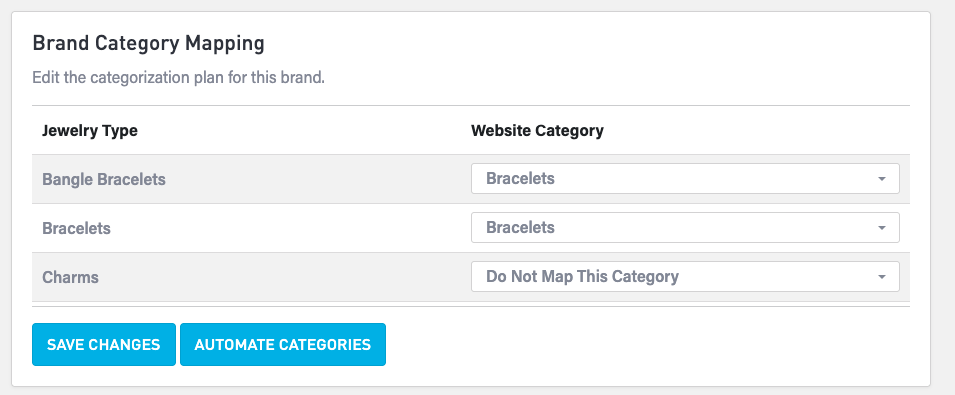
Why is a retailer only displaying certain product categories from my brand?
Retailers are able to map your categories to their website categories via their SiteManager. Some retailers might choose to not map one or more of your categories, causing some of your products to not display on their website. This is the retailer’s prerogative.
Why has a retailer not received or displayed my latest price update?
There are a few possibilities:
Your latest data sheet has not yet been imported by Punchmark
They have turned OFF automatic imports for your brand, causing their products to be “frozen in time”. This is a retailer’s decision, and can be managed in SiteManager by the retailer or the retailer’s account manager.
The product is NOT one of your premium vendor products, and is instead a manual upload product or a POS product.
If the SKU # for the product starts with 001- or 002- etc, it is a POS product.
Why is a product from my brand appearing on a retailer’s website even though it is not included in my Premium Vendor product feed?
There are a few possibilities:
The product is NOT one of your premium vendor products, and is instead a manual upload product or a POS product.
If the SKU # for the product starts with 001- or 002- etc, it is a POS product.
For diagnosis, send the link of the product and a screenshot to vendors@punchmark.com with a description of the issue.
How do I add another line of jewelry to the Premium Vendor Program?
Contact vendors@punchmark.com for instructions. Additional lines of jewelry are managed by your same login for the Vendor Portal, but with separate permissions. There is a one-time $500 setup fee for each additional brand.
My products are live in the Premium Vendor Program, but retailers are not subscribing. How can I increase retailer adoption?
In the interest of neutrality, Punchmark does not promote any vendor products outside of paid partnerships. It is your responsibility to promote your products.
Can you give us a list Punchmark Retailers so we can see which of our clients overlap?
Punchmark will not provide anyone with client lists, however we can provide an overlap analysis if you provide a client list. The client list need only include Store Name, City, and State.
Can we control which retailers have access to specific brands or product segments?
Yes, in the Vendor Portal > Subscribers you are able to control which retailers have access to which brands.
Can product listings be customized or filtered differently for individual retailers?
We are unable to provide curated feeds at this time for individual retailers, however retailers are able to request that certain product types are filtered before they display on their site. This can be done by the retailer by opening a ticket for their Account Manager.
This works best when used broadly (filtering out categories, instead of individual SKUs).
Are there opportunities to promote or advertise our brand to Punchmark retailers?
Yes! Punchmark allows Vendors to market via our podcast, In the Loupe, at our Client Workshop each Spring in Charlotte, NC, and with comprehensive marketing packages. Contact vendors@punchmark.com for more information.
How often should I update my product data?
It is recommended to update product data at least every 30 days to ensure accurate pricing and availability. Vendors must update products within 90 days to maintain eligibility in the Premium Vendor Program.